Friday, 2 April 2021

LED strip too dim to power SAD light


Cheap LED strips arrived today but too dim to illuminate the small panel brilliantly enough. 


Will order the ones recommended now 🙂
The CRI of 90 or above is the important bit 🙂

Though, while I'm waiting 4+ weeks for those, I could try using both 2M strips behind the panel rather than illuminating from the side.

Nope it doesn't diffuse the lights well enough.


The large panel might though? Well it diffuses OK but even with two strips and them all facing the panel I doubt if it would have the brilliance needed to provide a strong daylight experience. But I could try tomorrow.


Thursday, 1 April 2021

Checked if EPEVER Tracer4215BN charge controller still works. Conclusion: Maybe

 All looks good. 

https://www.hinergy.net/product/solar-charge-controller-4/


At start (14:11) battery 11.95v and panel 13.97v:


And later (16:03) in the day, 11.95v @ 120mA battery, 13.61v panel


So no increase in battery voltage even though EPEVER green LEDs are both on.

A bit later still (17:33) 11.89v @ 120mA battery, 13.19v panel


So battery voltage has actually gone down! Due to powering EPEVER unit?

https://www.solarpanelamerica.com/wp-content/uploads/2018/02/EP-Solar-Tracer-4215BN-Installation-and-operation-manual.pdf

Which states on page 20:  <=60mA @ 12v

 So more testing needed!


Got broken LED screens for SAD lights

I had seen a great Youtube video on how to make cheap SAD lights.'

https://youtu.be/8JrqH2oOTK4

So did the same :)


Might be able to use existing PSU for large screen.


Googled "LED strip JLD320B1235"

https://www.electromix.co.uk/led-strips/3647-jld320b1235-078cs-c-led-strip-el6820-wj2.html

https://www.aliexpress.com/i/4001111181238.html?spm=2114.12057483.0.0.6f3a7f015dsMaO
So 3V each element is that 3V x 22 x 2W or 33V x 2 or 66V ?
Best try 3v battery first :)

Product Description
Backlight strip production information
1.Consistent with the original, Brand New, no need to modify it, easy to install
2.Long operating life, typically lasting over 100,000 hours
3.Brightness is consistent with the original, brightness up to 700 nits
4.Product length: 575 mm( length) * 10mm (width) * 1.0 mm (height) , 11 LED Lamps
5.Voltage: 0-94V, Single lamp voltage is 3V

(19:34) Excellent so how do I provide 66V at (2W a lamp) so 44W is 750mA.


(20:51) Can I get 90V at 200W from the old PSU?

https://www.ebay.co.uk/itm/17IPS62-Vestel-Power-Supply-Board-23327056-FREE-UK-Delivery/122784718215

Got cct diagram :)
https://elektrotanya.com/vestel_17ips62-r2_psu_sch.pdf/download.html
Saved PDF to :
kilnageer@minty-Inspiron-3537:~$ ls Documents/SmartHomes/SAD\ Light\ Panels/
vestel_17ips62-r2_psu_sch.pdf

file:///home/kilnageer/Documents/SmartHomes/SAD%20Light%20Panels/vestel_17ips62-r2_psu_sch.pdf
file:///home/kilnageer/Documents/SmartHomes/SAD%20Light%20Panels/map3249_datasheet.pdf

The MAP3249 (U2) takes VIN pin 16 (12v) and EN pin 5 (driven by BKL_ON/OFF which is pin 5 of CN4) and is active high.
It also takes PWM pin 14 (6v max, TTL levels, 100 to 2KHz) (driven by PWM_DIM which is pin 7 of CN4) and ADIM pin 3 (driven by V_ADIM which is held at 2.6v by voltage divider from V_REG (which is VLDO pin 1 of U2)

GATE pin 13 becomes GATE_CON and controls Vled
CS pin 12 becomes CS_CON and also controls Vled

CN6 only Vled pin 1 and CH_4 pin 7 (55v max) are used by wired connection lead. Is this 24v to the LEDs?

Will try it tomorrow with a NodeMCU providing the PWM will then upgrade my Solar Pump NodeMCU code so if it doesn't get a command in 10 mins it takes control and goes into safety mode!


Thursday, 10 December 2020

Kamstrup OMNIPOWER investigations

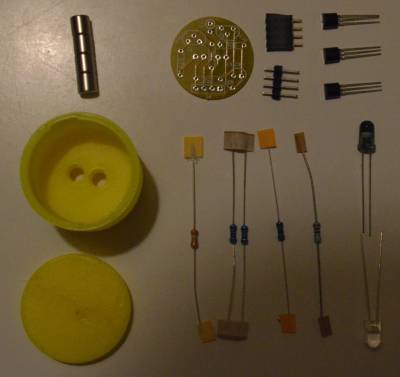
Well I built the kit I had bought using PayPal to his e-mail address for 21 euros.

Google Translate is your friend when translating from the Danish :)

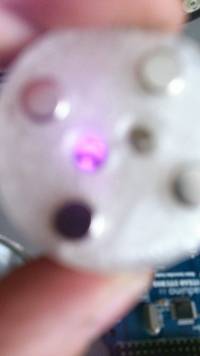
All went well though as he suggested you need to drill the holes for the LEDs and the magnets.

I based my design on an ESP8266 NodeMCU v3 LoLin board I had lying around (select Arduino board: "NodeMCU 1.0 (ESP-12E Module)" from library ESP8266 by ESP8266 Community version 2.7.4 using preferences:
       http://arduino.esp8266.com/stable/package_esp8266com_index.json

After much unwarranted trepidation on my part everything worked first time! And using his code the device successfully requested 6 registers but got all zeros back. Obviously, I was hoping for useful usage data like in his post:


But instead I got:

11:21:15.527 
11:21:15.527 Kamstrup OMNIPOWER Meter Reader: v1.0 Thurs 10th Dec 2020 11:13 
11:21:15.527 
11:21:25.541 50: 63,16,0,50,51,1,0,0,96,13, 10
11:21:25.673 51: 63,16,0,51,51,4,0,1,239,105,230,63,11, 13
11:21:25.802 52: 63,16,0,52,51,4,0,0,0,0,0,46,253, 13
11:21:25.933 53: 63,16,0,53,51,4,0,0,0,0,0,105,46, 13
 
So what I found was that my meter worked differently to his. So I polled all 64K registers to find out which ones would respond. I found 50 that responded:
 
11:06:54.412 50: 63,16,0,50,51,1,0,0,96,13, 10
11:06:54.544 51: 63,16,0,51,51,4,0,1,239,105,230,63,11, 13
11:06:54.674 52: 63,16,0,52,51,4,0,0,0,0,0,46,253, 13
11:06:54.805 53: 63,16,0,53,51,4,0,0,0,0,0,105,46, 13
11:09:48.457 1001: 63,16,3,233,51,4,0,1,239,105,230,181,214, 13
11:09:50.550 1010: 63,16,3,242,51,10,0,0,0,0,0,0,0,1,239,105,230,249,124, 19
11:09:53.961 1030: 63,16,4,6,51,4,0,14,255,234,186,239,185, 13
11:09:57.018 1047: 63,16,4,23,53,8,0,2,2,55,9,11,8,12,20,76,157, 17
11:10:03.405 1083: 63,16,4,59,51,4,0,172,37,112,140,251,255, 13
11:10:11.664 1126: 63,16,4,102,54,18,0,54,56,54,49,55,49,49,49,78,50,52,51,50,48,52,48,54,57,209,23, 27
11:10:29.115 1221: 63,16,4,197,0,1,0,85,131,75, 10
11:10:32.799 1243: 63,16,4,219,0,17,0,0,0,0,0,0,0,0,0,0,0,0,0,0,0,0,0,0,150,170, 26
11:11:32.090 1568: 63,16,6,32,54,16,0,53,55,48,54,53,54,55,51,50,52,54,55,52,51,48,55,11,62, 25
11:25:09.208 6025: 63,16,23,137,51,4,0,3,78,228,3,80,244, 13
11:25:09.338 6026: 63,16,23,138,51,4,0,3,9,234,150,240,175, 13
11:25:09.826 6030: 63,16,23,142,54,4,0,65,52,0,0,158,99, 13
11:25:09.956 6031: 63,16,23,143,54,4,0,70,54,0,0,230,253, 13
11:25:33.195 6157: 63,16,24,13,0,10,0,75,65,77,0,0,0,1,239,105,230,166,171, 19
11:25:33.790 6159: 63,16,24,14,51,16,0,58,45,120,65,81,188,197,206,47,75,147,177,68,86,238,207,56,169, 25
11:25:38.331 6180: 63,16,24,36,51,4,0,204,192,135,174,101,2, 13
11:25:44.294 6213: 63,16,24,69,54,13,0,53,48,57,56,49,53,50,54,45,70,54,0,0,250,100, 22
11:25:50.399 6247: 63,16,24,103,54,14,0,49,75,65,83,48,48,51,50,52,54,55,52,51,48,236,41, 23
11:25:51.020 6252: 63,16,24,108,0,1,0,0,26,100, 10
11:25:52.988 6260: 63,16,24,116,51,4,0,3,9,234,183,143,36, 13
11:25:53.118 6261: 63,16,24,117,54,4,0,68,55,0,0,120,0, 13
11:25:53.364 6262: 63,16,24,118,51,4,0,1,40,221,228,170,136, 13
11:25:54.578 6272: 63,16,24,128,51,4,0,169,194,160,116,146,55, 13
11:25:56.180 6277: 63,16,24,133,51,1,0,0,62,33, 10
11:25:56.307 6278: 63,16,24,134,51,1,0,7,160,20, 10
11:25:56.434 6279: 63,16,24,135,51,1,0,0,122,162, 10
11:25:56.561 6280: 63,16,24,136,51,1,0,0,31,91, 10
11:25:56.689 6281: 63,16,24,137,51,1,0,7,197,237, 10
11:25:56.815 6282: 63,16,24,138,51,1,0,7,43,63, 10
11:25:56.943 6283: 63,16,24,139,51,1,0,7,129,110, 10
11:25:57.070 6284: 63,16,24,140,51,1,0,7,230,186, 10
11:25:57.197 6285: 63,16,24,141,51,1,0,7,76,235, 10
11:25:57.324 6286: 63,16,24,142,51,1,0,7,162,57, 10
11:25:57.451 6287: 63,16,24,143,51,1,0,7,8,104, 10
11:25:57.578 6288: 63,16,24,144,51,1,0,7,105,203, 10
11:25:58.945 6291: 63,16,24,147,51,1,0,7,135,25, 10
11:25:59.072 6292: 63,16,24,148,51,1,0,7,224,205, 10
11:26:00.512 6304: 63,16,24,160,51,1,0,0,21,194, 10
11:26:03.071 6317: 63,16,24,173,0,1,0,0,131,141, 10
11:26:03.200 6318: 63,16,24,174,0,1,0,0,109,95, 10
11:26:03.329 6319: 63,16,24,175,0,1,0,0,199,14, 10
11:26:03.458 6320: 63,16,24,176,0,2,0,198,23,61,212, 11
11:26:04.592 6321: 63,16,24,177,0,2,0,198,28,201,31, 11
11:26:04.721 6322: 63,16,24,178,0,2,0,198,12,21,206, 11
11:26:04.850 6323: 63,16,24,179,0,2,0,198,32,181,128, 11
11:26:04.979 6324: 63,16,24,180,0,2,0,198,31,186,125, 11
11:26:08.409 6344: 63,16,24,200,0,1,0,0,185,6, 10

But none of these appeared to change which would indicate they held a power reading.
Though some did match with meter serial number etc. But all static data.

Though, in hindsight there is one, 1047, which appears to have date/time. 
11:09:57.018 1047: 63,16,4,23,53,8,0,2,2,55,9,11,8,12,20,76,157, 17
11:10:11.664 1126: (63,16),(4,23),(8.0.2.2),sec,min,hour,day,month,year,(76,157)
So "11:09:55 8th Dec 2020". I now also know that 0.8.0.2.2 is the OBIS code for the RTC.
See  


I send e-mail toi ESB networks asking for a:
Consumer communication channel (CCC) module


Bought the kit from Facebook / PayPal for 21 euros.


Wednesday, 18 November 2020

Smart Electricity meter installed by ESB Networks this morning

I had requested a night meter so that I could charge my batteries cheaply at night and draw power fro the during the day. However, after any e-mails between myself and ESP Networks, Community Power and CRU (https://www.cru.ie/home/smart-meters/) a fella just turned up out of the blue.


Sadly, while in Germany I could insert a module to allow consumer monitoring the ESB have security tagged that slot.

See page 10 of:

"In OMNIPOWER® single-phase meter, it is possible to mount a CCC module. The module can be used for communication and data exchange with smart home products such as energy displays and external relays. The CCC module is mounted without using tools or breaking the seal of the meter. The mounting may be done by e.g. the consumer himself."

  However, there's an IR window that should allow serial comms to the unit. https://wiki.hal9k.dk/projects/kamstrup

 Indhold af kit

 I've bought one of these kits and should be able to attached magnetically to the smart meter.


And read basic usage data from a NodeMCU and post to MQTT

Saturday, 12 September 2020

Tuya ZigBee TRVs proving tricky to control.

The first three I bought work fine on my Raspberry Pi Zigbee2MQTT set-up but the second three need to be woken up before they will hear a command.

But I've sniffed the comms over Wireshark when using their app so I should be able to crack it.


TUYA Zigbee TRV Thermostat Valve Thermostatic Radiator ...

This command worked!

pi@tola-smarthome-v2:~ $ date; mosquitto_pub -h localhost -p 1883 -u ***USERNAME*** -P ***PASSWORD*** -t zigbee2mqtt/Tonys\ Bedroom\ TRV/set/force -m "open"
Mon 23 Nov 2020 08:10:56 PM GMT

Nov 23 20:10:56 tola-smarthome-v2 npm[30279]: Zigbee2MQTT:debug 2020-11-23 20:10:56: Received MQTT message on 'zigbee2mqtt/Tonys Bedroom TRV/set/force' with data 'open'
Nov 23 20:10:56 tola-smarthome-v2 npm[30279]: Zigbee2MQTT:debug 2020-11-23 20:10:56: Publishing 'set' 'force' to 'Tonys Bedroom TRV'

Nov 23 20:10:57 tola-smarthome-v2 npm[30279]: Zigbee2MQTT:debug 2020-11-23 20:10:57: Received Zigbee message from 'Tonys Bedroom TRV', type 'commandSetDataResponse', cluster 'manuSpecificTuyaDimmer', data '{"data":{"data":[1],"type":"Buffer"},"dp":1130,"fn":0,"status":54,"transid":122}' from endpoint 1 with groupID 0

Nov 23 20:10:57 tola-smarthome-v2 npm[30279]: Zigbee2MQTT:info  2020-11-23 20:10:57: MQTT publish: topic 'zigbee2mqtt/Tonys Bedroom TRV', payload '{"auto_lock":"MANUAL","away_preset_days":1,"away_preset_temperature":15,"boost_time":300,"child_lock":"UNLOCKED","comfort_temperature":20,"current_heating_setpoint":"5.0","eco_temperature":15,"force":"open","holidays":[{"hour":6,"minute":0,"temperature":20},{"hour":8,"minute":0,"temperature":15},{"hour":11,"minute":30,"temperature":15},{"hour":12,"minute":30,"temperature":15},{"hour":17,"minute":30,"temperature":20},{"hour":22,"minute":0,"temperature":15}],"linkquality":60,"local_temperature":"15.0","local_temperature_calibration":"0.0","max_temperature":35,"min_temperature":5,"position":0,"preset":"manual","system_mode":"manual","week":"7","window_detection":"OFF","window_detection_params":{"minutes":10,"temperature":5},"workdays":[{"hour":11,"minute":0,"temperature":20},{"hour":11,"minute":1,"temperature":15},{"hour":11,"minute":30,"temperature":15},{"hour":12,"minute":30,"temperature":15},{"hour":17,"minute":30,"temperature":20},{"hour":150,"minute":0,"temperature":15}]}'


Monday, 29 July 2019

Oil tank sensor

Installed an oil tank level monitor in Tola Park yesterday.


Based on a HC-SR04 ultrasonic sensor and an ESP8266 NodeMCU module and code from:

https://www.instructables.com/id/Distance-Measurement-Using-HC-SR04-Via-NodeMCU/

It publishes to MQTT which can then be displayed as a graph using Node-Red